Interpolating octahedral GRIB data
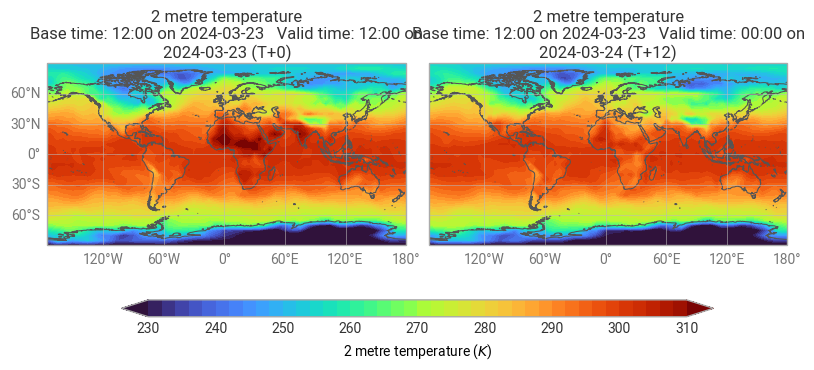
This example shows how to interpolate GRIB data defined on an octahedral reduced Gaussian grid. We will also see how to inspect and plot the resulting data and how to convert it to Xarray.
To make this notebook work earthkit-data (version >= 0.6.0) and earthkit-plots have to be installed. The data will be represented as an earthkit-data GRIB FieldList.
Interpolation
[1]:
import os
from earthkit.regrid import interpolate
from earthkit.data import from_source

# Get octahedral reduced Gaussian GRIB data containing two fields.
ds = from_source(
    "url",
    "https://sites.ecmwf.int/repository/earthkit-regrid/examples/O32_multi.grib2")

# the target grid is a global 5x5 degree regular latitude-longitude grid
out_grid = {"grid": [5,5]}

# perform interpolation for each field and add results
# to a new fieldlist stored in memory
r = interpolate(ds, out_grid=out_grid, method="linear")

d = r.data()
lat = d[0]
lon = d[1]
vals = d[2:]
lat.shape, lon.shape, vals.shape
[1]:
((37, 72), (37, 72), (2, 37, 72))
[2]:
lat[:3, 0], lon[:3, 0], vals[0, :3, 0]
[2]:
(array([90., 85., 80.]),
 array([0., 0., 0.]),
 array([251.78068542, 250.66488784, 248.92256676]))
Please note that the interpolation only works between a predefined set of global grids. See the Pre-generated matrices for details.
Plotting the results
[3]:
import earthkit.plots as ekp

ekp.quickplot(r)
[3]:
<earthkit.plots.components.figures.Figure at 0x12321cec0>
Converting the results to Xarray
[4]:
r.to_xarray()
[4]:
<xarray.Dataset> Size: 44kB
Dimensions:    (step: 2, latitude: 37, longitude: 72)
Coordinates:
  * step       (step) timedelta64[ns] 16B 00:00:00 12:00:00
  * latitude   (latitude) float64 296B 90.0 85.0 80.0 75.0 ... -80.0 -85.0 -90.0
  * longitude  (longitude) float64 576B 0.0 5.0 10.0 15.0 ... 345.0 350.0 355.0
Data variables:
    2t         (step, latitude, longitude) float64 43kB ...
Attributes:
    param:        2t
    paramId:      167
    class:        od
    stream:       oper
    levtype:      sfc
    type:         fc
    expver:       0001
    date:         20240323
    time:         1200
    domain:       g
    Conventions:  CF-1.8
institution: ECMWFWriting the results to disk
Write the resulting fieldlist to disk:
[5]:
out_file = "_res_O32_to_5x5.grib"
r.to_target("file", out_file)